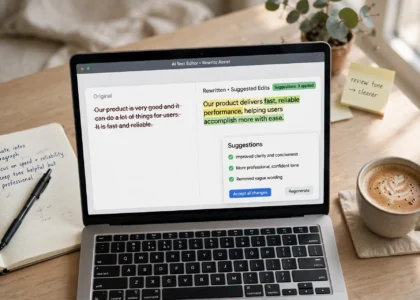

Grammarly AI Text Humanizer is a free tool that rewrites AI drafts so they read like human writing. You paste up to 1,500 words into the web tool and click Humanize. You can also open the Humanizer agent inside Grammarly docs and pick a voice. It usually keeps your meaning. Still, you must check the rewrite. It can change facts, and it cannot guarantee that detectors will pass your text.
What Is the Grammarly AI Text Humanizer?
Grammarly AI Text Humanizer takes AI text and rewrites it so it sounds natural. It removes stiff phrasing, flat rhythm, and repetitive patterns. The goal is simple: your draft should read as if a person wrote it.
Grammarly offers the humanizer in two forms. One is a free web page tool. The other is the Humanizer agent in Grammarly docs and Superhuman Go. Both rewrite AI-sounding text. The agent gives you more control, with voices and tracked changes.
This tool is not a grammar checker. The humanizer works at a higher level. It changes tone, sentence flow, and word choice. It can turn a formal, robotic paragraph into one that sounds warm and direct.
Bloggers, marketers, and professionals use it for posts, sales copy, emails, and proposals. In each case, the humanizer is a starting point, not a final editor. You still need to read the result.
How Does the Grammarly AI Text Humanizer Work?
Grammarly describes the process in four steps. First, you paste your AI text into the tool. Second, the tool scans it for AI patterns, such as overly formal tone and repeated phrasing. Third, it rephrases sentences and adjusts wording and tone. Fourth, you get a revised version that keeps the meaning in most cases. The whole pass takes seconds.
The Free Web Tool
The free web tool is a single box on the Grammarly site. You paste your text, click Humanize, and a rewrite appears in about ten seconds. It accepts up to 1,500 words per paste and works in six languages: English, Spanish, French, German, Portuguese, and Italian.
The web tool is fast and simple, but it has limits. There is no tone setting and no voice choice. You cannot see which words changed. You get one rewritten block, and you decide what to keep. That is often enough for a short email. For a long article, work in chunks of 1,500 words or less.
The Humanizer Agent in Grammarly Docs
The Humanizer agent lives in Grammarly docs and Superhuman Go. Grammarly says it is open to Free, Plus, and Pro subscribers. In docs, click the Humanizer icon on the agents tab on the right side of your document.
The agent offers five preset voices: The Naturalist, The Precisionist, The Everyday Voice, The Executive, and The Scholar. You can also create a custom voice from a writing sample of 200 words or more.
The agent shows its rewrite as tracked changes, with Accept and Dismiss buttons. Bars down the left side show a prompt for each passage. You decide what to take and what to leave.
Pro unlocks the full Humanizer experience. The free web tool covers quick jobs.
Worked Example: Before and After
The example below is illustrative. It was written for this article to show the kind of change the humanizer makes. It is not a screenshot of the tool output.
Assumptions: the draft is a short client email about a late delivery. It is about 90 words long. It was written by an AI chatbot from a plain prompt. The writer wants a warm, professional tone.
Before (AI draft):
“Dear valued client, we are writing to inform you that your order has been delayed. The delay is due to unforeseen circumstances in our supply chain. We understand that this situation may cause inconvenience. We are working diligently to resolve this matter. We will provide you with an update as soon as possible. Thank you for your understanding and patience in this matter.”
After (humanized version):
“Hi Sarah, I wanted to let you know your order will arrive a few days later than planned. Our supplier missed a shipment, and I am sorry for the holdup. I know this throws off your schedule. I am tracking the delivery myself and will email you the new date on Friday. Thanks for bearing with us.”
Both versions carry the same facts. But the second version reads like a person wrote it. It names the client, uses short sentences, and drops stiff phrases like “valued client.”
| What changed | Before | After |
|---|---|---|
| Greeting | Formal, generic | Named greeting |
| Sentence length | Long, even | Short, mixed |
| Stock phrases | “Valued client”, “unforeseen circumstances” | Plain words |
| Ownership | “We are working diligently” | “I am tracking the delivery myself” |
| Promise | Vague, “as soon as possible” | Specific, Friday |
Notice the last row. The humanized version adds a specific day. A humanizer can also change numbers, names, or dates by mistake. Check every rewrite. The tool improves the sound of your text. It does not check your facts.
How Much Does the Grammarly AI Text Humanizer Cost?
The humanizer costs nothing to try, and the free web tool works without a paid plan. The agent is open to Free, Plus, and Pro subscribers in docs and Superhuman Go. The paid plan matters when you want the full agent experience and more AI prompts.
Grammarly retired the Premium name. The paid plan is now Grammarly Pro. Prices below come from Grammarly’s own plans page, checked on 27 Nov 2026. Prices can change.
| Plan | Price | What you get |
|---|---|---|
| Free | $0 | Spelling and grammar checks, tone detection, 100 AI prompts a month |
| Pro, billed annually | $12 per member a month, billed as $144 a year | Full-sentence rewrites, plagiarism and AI detection, 2,000 AI prompts a month |
| Pro, billed quarterly | $60 every three months, about $20 a month | The same Pro features as annual billing |
| Pro, billed monthly | $30 per month | The same Pro features, with no long commitment |
| Enterprise | Custom quote | Unlimited AI prompts and admin controls |
Twelve months of monthly billing costs $360, against $144 a year. If you plan to use Pro all year, annual billing saves real money. If you only need one month, monthly billing is safer.
For most people, the free plan is enough to test the humanizer. Pay for Pro only if you write every day.
What the Grammarly AI Text Humanizer Cannot Do
Humanizers are useful, but they have hard limits.
It can change your facts
Independent tests found that the free web tool rewrote facts, not just wording. In one test, an essay scored as fully AI came back at zero percent AI on each detector. The tool had changed what the essay said. Every rewrite needs a fact check. Read names, numbers, dates, and claims against your source.
It does not guarantee that detectors will pass your text
Grammarly’s own help pages are direct: the tool is not intended to bypass AI detectors. Its own AI Detector may even flag humanized text, since the rewrite comes from Grammarly’s language model. In tests, the same text scored differently on different detectors. No humanizer can promise a clean score.
It can cause trouble in school and college work
Turnitin draws a clear line in its detection guidance. Grammar fixes are, in most cases, not flagged. Generative features, such as paraphrasing, will likely be flagged. A humanizer is a generative feature. If your school limits AI use, humanizing an AI draft can count as cheating. Check your rules first, and disclose AI use where asked.
It cannot build your voice from nothing
The preset voices help, but a custom voice needs a writing sample of 200 words or more. If you have never written in the style you want, the tool has nothing to learn from. Write a short sample by hand first, then build the voice from it.
It does not check facts or sources
The humanizer only rewrites words. It does not verify claims or catch a wrong statistic. Use it after your facts are right. For more on how detectors judge text, see our guide to the most accurate AI detectors.
Grammarly vs Other AI Humanizers
Grammarly is not the only humanizer. Clever AI Humanizer, Duey.ai, Writesonic’s AI Humanizer, and QuillBot each fit a different user. The table compares them on the facts that matter most.
| Tool | Free offer | Best for | Watch out for |
|---|---|---|---|
| Grammarly AI Text Humanizer | Free web tool, 1,500 words per paste; agent on Free, Plus, Pro | Everyday writing in Grammarly, with voices | Can change facts; may still be flagged |
| Clever AI Humanizer | About 200,000 words a month free, 7,000 per run (user reports) | High volume free use; three styles: Casual, Academic, Formal | Output can feel loose; scores vary |
| Duey.ai Humanizer | Free to try; limits on its site | Quick one-off humanizing | Less public testing than Grammarly |
| Writesonic AI Humanizer | Paid suite; tight free limits | Polished marketing copy | Free use runs out fast |
| QuillBot | Free paraphraser, small limits | Sentence-level fixes | Best as a second pass |
Clever deserves a closer look. User reviews report about 200,000 free words a month, with runs of about 7,000 words each. Its Casual style scored zero percent AI on ZeroGPT in user tests. Stricter detectors still flagged parts of the same text. If your budget is zero and your volume is high, Clever is the strongest free option.
Our pick is simple. Use Grammarly if you already write in Grammarly. Use Clever if you need high volume for free. Use Writesonic if marketing polish is the priority. Whatever tool you pick, keep the manual editing pass. No tool replaces it. See our QuillBot AI humanizer guide, our Grammarly Humanize AI guide, and our AI tools for writing roundup.
How to Get the Best Results From the Grammarly AI Text Humanizer
Use this checklist for clean, natural output.
- Start with a good draft. Fix facts and structure first. The tool cannot fix a weak argument.
- Work in small chunks. Paste one section at a time. Long pastes hide errors and mix tones.
- Pick the right voice. Use The Everyday Voice for general writing, The Executive for work emails.
- Build a custom voice. Give the agent a 200-word sample that sounds like you at your best.
- Read the result aloud. Fix what sounds odd by hand.
- Check every fact. Verify names, numbers, dates, and quotes against your source.
- Add your own details. A real example or a specific number does more than any rewrite.
- Run a detector check last. Test the final text if your publisher or teacher uses one. Treat the score as a hint, not a verdict.
Save your original draft before you humanize. If the rewrite drifts, compare versions and restore what was lost.
Is It Safe and Ethical to Use?
Using a humanizer is legal in most cases, but it is not always honest. It depends on where you use it and what you claim.
Grammarly states the tool is not intended to bypass AI detectors. It warns against using a humanizer to disguise AI text. Where AI use is restricted, that may count as cheating or plagiarism. That warning matters most for students.
For bloggers, marketers, and professionals, the rules are looser but still real. If you use AI for a draft, say so where your publisher or client asks. A humanized draft that is thin or wrong will still rank poorly.
On safety, avoid pasting passwords, private client data, or confidential documents into the tool. For normal drafts, that is the only caution you need.
Who Should Use It, and Who Should Skip It
Use it if you draft with AI and write inside Grammarly already. It fits bloggers, marketers, job seekers, and non-native English writers. The free web tool is enough to test it.
Skip it if your school or workplace bans AI writing help. Skip it too if you need exact legal or medical wording, or a guaranteed detector pass. In those cases, write by hand.
Frequently Asked Questions
Yes. The web tool is free, and the Humanizer agent is open to Free, Plus, and Pro subscribers. Pro adds 2,000 AI prompts a month.
No. Grammarly says the tool is not intended for that. Humanized text can still be flagged, and detectors disagree, so never rely on a single score.
The free web tool accepts up to 1,500 words in one paste. For longer text, work in sections.
Yes. Grammarly says the humanizer works in six languages: English, Spanish, French, German, Portuguese, and Italian.
It aims to keep your meaning, but it can change facts, numbers, and claims. Always read the result and check it against your source.
The Humanizer targets AI-sounding patterns and matches a voice. The Paraphraser rewords text for clarity and variety. Both share your custom voice profiles.